
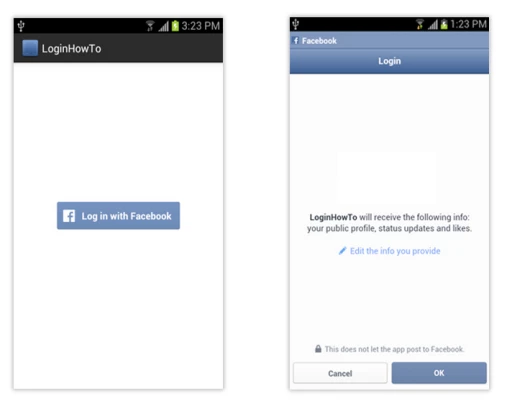
How We Can Facebook Login Add To Your App.
Facebook
Login
- By Code solution
- Jan 20th, 2021
- 0 comments
- 0
By using Facebook Login you can fetch the user data from his Facebook id.
- First, you have to open new empty project.
- Open this website in your browser.
https://developers.facebook.com/
- Select here step platform option.
- Select your project package name from the manifest file.
Example:- waytofeed.wapptech.com.howwecanloginfromfacebook.MainActivity
- Paste this package name in Google Play Package Name.
- After that, we have to use this package name in Class Name after that user has to write.MainActivity after package name.
Example:- waytofeed.wapptech.com.howwecanloginfromfacebook.MainActivity
- After that, we need here Key Hashes.
- For key hashes first, open your system cmd after that paste this link.
C:\ cd Program Files\Java\jdk1.8.0_25\bin
- After that use this link for window.
keytool -exportcert -alias androiddebugkey -keystore "C:\Users\USERNAME\.android\debug.keystore" | "PATH_TO_OPENSSL_LIBRARY\bin\openssl" sha1 -binary | "PATH_TO_OPENSSL_LIBRARY\bin\openssl" base64
- If you are using Mac Os so use this link.
keytool -exportcert -alias androiddebugkey -keystore ~/.android/debug.keystore | openssl sha1 -binary | openssl base64
- Click enter You will get your project hash key.
- This hash key is 28 character So copy this hash key and pastes the Key Hashes option.
- Select Sign yes.
- Select Save the changes. and select use this package name.
- After that, you have App id .after that copy this id.
- After that copy this id and paste valuse-->>string-->> Create new resoucre-->> paste this id.
- After that go to docs.
- Select facebook login.--->> select Android.
- Select the metadata from a site and paste the manifest file and check the manifest file and string file name is same or not.
      <meta-data android:name="com.facebook.sdk.ApplicationId"
        android:value="@string/facebook_app_id"/>
- After that, we have to give internet permission in manifest file.
<uses-permission android:name="android.permission.INTERNET" />
- After that use this method in build folder before dependencies.
{
    mavenCentral()
}
- Add this dependencies in gradle folder.
compile 'com.facebook.android:facebook-android-sdk:4.+'
- After that have to ready xml View.
<?xml version="1.0" encoding="utf-8"?>
<RelativeLayout xmlns:android="http://schemas.android.com/apk/res/android"
    xmlns:app="http://schemas.android.com/apk/res-auto"
    xmlns:tools="http://schemas.android.com/tools"
    android:layout_width="match_parent"
    android:padding="16dp"
    android:layout_height="match_parent"
    tools:context="waytofeed.wapptech.com.howwecanloginfromfacebook.MainActivity">
<TextView
    android:layout_width="match_parent"
    android:layout_height="wrap_content"
    android:id="@+id/facebook_text_id"
    android:text="Login Page"
    android:gravity="center"/>

 <com.facebook.login.widget.LoginButton
     android:layout_width="wrap_content"
     android:layout_height="wrap_content"
     android:id="@+id/facebook_id"
     android:layout_centerInParent="true"
     />
- After that create this code in java page.
LoginButton loginButton;
CallbackManager callbackManager;
TextView textView;
@Override
protected void onCreate(Bundle savedInstanceState) {
    super.onCreate(savedInstanceState);
    setContentView(R.layout.activity_main);

    FacebookSdk.sdkInitialize(getApplicationContext());
    loginButton = findViewById(R.id.facebook_id);
    textView = findViewById(R.id.facebook_text_id);
    callbackManager = CallbackManager.Factory.create();
- After that use this code.
  loginButton.registerCallback(callbackManager, new FacebookCallback<LoginResult>() {
        @Override
        public void onSuccess(LoginResult loginResult) {
            textView.setText("Login Success \n" + loginResult.getAccessToken().getUserId() + "\n" + loginResult.getAccessToken().getToken());

        }

        @Override
        public void onCancel() {
            textView.setText("Login Cancelled");
        }

        @Override
        public void onError(FacebookException error) {

        }
    });
}
- After That Create this method.
@Override
    protected void onActivityResult(int requestCode, int resultCode, Intent data) {
        callbackManager.onActivityResult(requestCode, resultCode, data);
    }
}
All Java Page Code:-
package waytofeed.wapptech.com.howwecanloginfromfacebook;

import android.content.Intent;
import android.support.v7.app.AppCompatActivity;
import android.os.Bundle;
import android.view.View;
import android.widget.Button;
import android.widget.TextView;

import com.facebook.CallbackManager;
import com.facebook.FacebookCallback;
import com.facebook.FacebookException;
import com.facebook.FacebookSdk;
import com.facebook.login.LoginManager;
import com.facebook.login.LoginResult;
import com.facebook.login.widget.LoginButton;

import java.lang.reflect.Array;


public class MainActivity extends AppCompatActivity {

    LoginButton loginButton;
    CallbackManager callbackManager;
    TextView textView;

    Button customLogin;   //custom

    @Override
    protected void onCreate(Bundle savedInstanceState) {
        super.onCreate(savedInstanceState);
        setContentView(R.layout.activity_main);

        FacebookSdk.sdkInitialize(getApplicationContext());
        loginButton = findViewById(R.id.facebook_id);
        textView = findViewById(R.id.facebook_text_id);
        callbackManager = CallbackManager.Factory.create();

        loginButton.registerCallback(callbackManager, new FacebookCallback<LoginResult>() {
            @Override
            public void onSuccess(LoginResult loginResult) {
                textView.setText("Login Success \n" + loginResult.getAccessToken().getUserId() + "\n" + loginResult.getAccessToken().getToken());
                }
            @Override
            public void onCancel() {
                textView.setText("Login Cancelled");
            }

            @Override
            public void onError(FacebookException error) {
                }
        });
    }
    @Override
    protected void onActivityResult(int requestCode, int resultCode, Intent data) {
        callbackManager.onActivityResult(requestCode, resultCode, data);
    }
}
GitHub: https://github.com/Sudarshan101/FBLoginAndroid

Social Links
Technologies












Tags
- #application
- #Express
- #NodeJS
- #Application
- #ionic2
- #nodeJs
- #API
- #module
- #Android
- #NPM
- #notification
- #message
- #push notification
- #NodeJs
- #Loader
- #ionic
- #android
- #native
- #React
- #AngularJs
- #menu
- #map
- #Setup
- #Android
- #card
- #IOS
- #Firebase
- #swipe
- #Login
- #android studio
- #Button
- #Navigation
- #Web
- #database
- #Drawer
- #React Native
- #ReactJS
- #boilerplate
- #React native
- #Redux
- #HTML
- #CSS
- #Studio
- #Slider
- #Validation
- #Form
- #PostgreSQL
- #Database
- #Alert
- #Import
- #Excel
- #express
- #feed
- #ionic3
- #Laravel
- #Effect
- #screen
- #effect
- #Flutter
- #Ios
- #image